cheatsheet
https://learn.mongodb.com/learn/course/mongodb-shell-cheatsheet/main/mongodb-shell-cheatsheet
🚀MongoDB CRUD 操作
| Commands |
凡例 |
| mongosh |
mongosh "mongodb+srv://cluster0.t34zxhe.mongodb.net/" --apiVersion 1 --username dnUser |
| db.version() |
显示DB版本 |
| show dbs |
显示全部DB |
| show collections |
显示当前DB里全部collections |
| show tables |
显示当前DB里全部collections |
| use <dbname> |
切换DB |
| db |
显示现在所在DB |
| db.getCollectionInfos() |
显示当前DB里全部collections的信息 |
⚜️有用的命令

⚜️Read
| Commands |
備考 |
| db.users.find() |
获取全部数据 |
| db.users.find({ “name.nickname”: “123 Main St” }) |
★查询子文档 { “name.nickname”}的数据 |
| db.users.find({ name: “Kyle” }) |
查询 {name: “Kyle” }的数据 |
| db.users.find({ name: /Kyle/ }) |
查询包含“Kyle” 的数据 |
| db.users.find({ name: /^Kyle/ }) |
查询 “Kyle”开头 的数据 |
| db.users.find({ name: { $eq: “Kyle” } }) |
相当于= |
| db.users.find({ name: { $ne: “Kyle” } }) |
相当于!= |
| db.users.find({ name: { $not: { $eq: “Kyle” } } }) |
相当于not |
| db.users.find({ age: { $gt: 12 } }) |
相当于> |
| db.users.find({ age: { $gte: 15 } }) |
相当于>= |
| db.users.find({ age: { $lt: 12 } }) |
相当于< |
| db.users.find({ age: { $lte: 15 } }) |
相当于<= |
| db.users.find({ name: { $in: [“Kyle”, “Mike”] } }) |
相当于in |
| db.users.find({ name: { $nin: [“Kyle”, “Mike”] } }) |
相当于not in |
| db.users.find({ $and: [{ age: 12 }, { name: “Kyle” }] }) |
相当于and |
| db.users.find({ $or: [{ age: 12 }, { name: “Kyle” }] }) |
相当于or |
| db.users.find({ name: { $exists: true } }) |
相当于exist |
| db.users.find({ name: { $exists: false} }) |
相当于name is null |
| db.users.find({ $expr: { $gt: [“$balance”, “$debt”] } }) |
相当于expr |
| db.users.find({ name: “Kyle” }, { name: 1, age: 1 }) |
获取{ name: “Kyle” }的数据,但只返回 name, age 2个项目 |
| db.users.find({}, { age: 0 }) |
获取全部数据,但只返回 除 age 以外的项目 |
| db.users.find().limit(1) |
获取第1条 |
| db.users.find().skip(4) |
跳过4条后,获取剩下全部数据 |
| db.users.find().skip(2).limit(3) |
跳过2条后,获取3条 |
| db.users.find().sort({ name: 1, age: -1 }) |
排序,相当于 order by name acs , age desc |
⚜️Create
| Commands |
備考 |
| db.users.insert( { } ) |
插入单条 / 多条 |
| db.users.insertOne({ name: “Kyle” }) |
插入单条 |
| db.users.insertMany([{ age: 26 }, { age: 20 }]) |
insertMany( [ {},{},{} ] ) 插入多条,数组形式 |
⚜️Update
| Commands |
備考 |
| db.users.update( {更新条件}, {$set:{ 更新内容}}) |
不指定mutil 的话,只更新一条 |
| db.users.updateOne({age:16},{$set:{age:20}}) |
年龄20的数据更新为 21,如果不写set,整条数据将被替换 |
| db.users.updateOne({ age: 12 }, { $set: { name: "Hi" }}) |
★不存在的字段就添加 { name: "Hi" } |
| db.users.updateOne({ age: 12 }, { $unset: { age: "" }}) |
年龄12的数据, 清空年龄 |
| db.users.updateMany({}, { $set: { school: "new collage" }}) |
$set,添加新项目{ school: "new collage" } |
| db.users.updateMany({}, { $unset: { school: "" }}) |
$unset,删除项目{ school: "new collage" } |
| db.users.updateMany({}, { $push: { friends: "John" }}) |
$push,添加一个数组{ friends: “John” } |
| db.users.updateMany({}, { $pull: { friends: "Mike" }}) |
$pull,从数组中删除一个项目{ friends: “Mike” } |
| db.users.updateMany({}, {$rename:{'school':'home'}}) |
$rename、項目名変更 'school' → 'home' |
| db.users.updateMany({ age: 12 }, { $inc: { age: 2 }}) |
$inc、年龄12的数据, 年龄+ 2 |
⚜️Delete
| Commands |
備考 |
| db.users.deleteOne({ age: 20 }) |
删除第一条 年龄20的数据 |
| db.users.deleteMany({ age: 12 }) |
删除所有 年龄12的数据 |
⚜️Index
| Commands |
備考 |
| db.users.getIndexes() |
获得所有index |
| db.users.createIndex({name:1}) |
添加index |
| db.users.createIndex({name:1,home:-1}) |
添加 联合index 1:升序 -1:降序 |
| db.users.dropIndex("index_name") |
删除index |
| db.users.dropIndexes() |
删除所有index |
| db.users.totalIndexSize() |
total size of all indexes of collection |
⚜️Aggregate
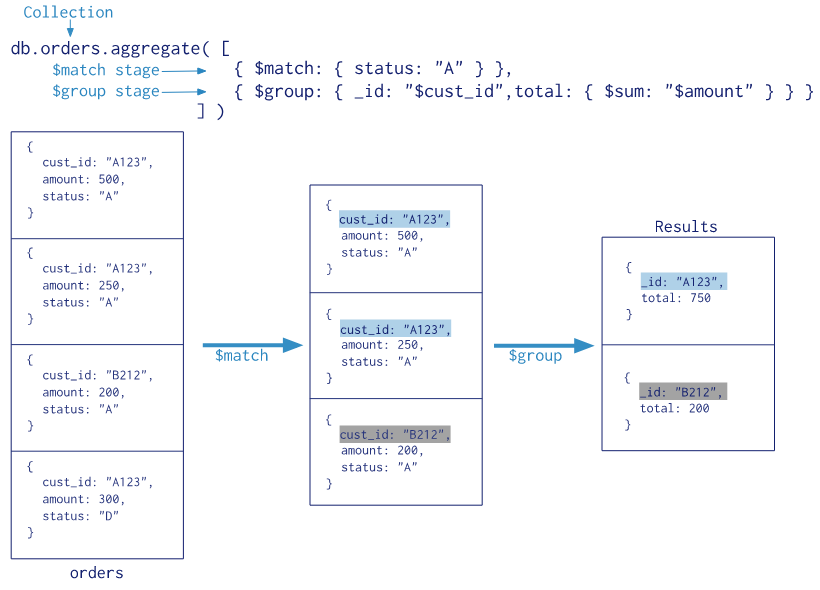
| 聚合操作 |
作用 |
SQL |
凡例 |
| $match |
过滤 |
where/having |
{ $match:{amount:{$gte:50}} } |
| $project |
投影 |
select |
{ $project:{_id: 0 ,cust_id:1,status:1} } //1:显示字段 0: 不显示字段 |
| $group 🔹 |
分组 |
group by |
{ $group:{_id:'$cust_id',total:{$sum:'$amount'}} } |
| $lookup |
左外连接 |
left outer join |
|
| $sort |
排序 |
order by |
{ $sort:{_id:1} } // 1:升序 -1:降序 |
| $limit |
结果限制 |
limit |
{ $limit:1 } // 仅显示1件 |
| $skip |
结果限制 |
skip |
{ $skip:3 } // 跳过3件 |
| $count |
件数 |
count |
{ $count:'count'} // 显示件数 |
| $unwind |
展开数组 |
ー |
将数组拆分为单独的文档 |
事例:
db.collection.aggregate() 不会报错,且会和find一样返回所有文档

db.orders.aggregate([
   {$group: {_id: null,count: { $sum: 1 }}}  //全表件数
])

db.orders.aggregate([
   {$group: { _id: null, total: { $sum: "$price" }}} //全表价格总和
])

db.users.aggregate([
  {$match:{access:"valid"}},
  {$group:{_id:"$cust_id",total:{$sum:"$amount"}}},
  {$project:{_id:1,status:1,amount:1} },
  {$sort:{total:-1}}            // 1:升序  -1:降序
])


// 展开数组
db.students.aggregate({$unwind:"$score"})
{
name:"张三",
score:[
    {subject:"语文",score:84},
    {subject:"数学",score:94},
    {subject:"英语",score:74}]
}

{name:"张三",score: {subject:"语文",score:84}}
{name:"张三",score: {subject:"数学",score:94}}
{name:"张三",score: {subject:"英语",score:74}}


// 展开2层数组
db.students.aggregate(
    {$unwind:"$hobbies"},
    {$unwind:"$hobbies.type"}
)


// $bucket用法
db.products.aggregate({
    $bucket:{
        groupBy:"$price",
        boundaries:[10,20,30,40],
        default:"other",
        output:{"count":{$sum:1}}
    }
})

// $facet用法
db.products.aggregate({
    $facet:{
        price:{
            $bucket:{ }
        },
        year:{
            $bucket:{ }
        }
    }
})
Tip
🔹group阶段的内存限制为100M。默认情况下超过此限制,group将产生错误。要允许处理大型数据集,请将allowDiskUse选项设置为true以启用$group操作以写入临时文件。
⚜️accumulator操作符
| 名称 |
描述 |
类比sql |
| $sum |
合计值 |
sum |
| $avg |
计算均值 |
avg |
| $first |
返回每组第一个文档,如果有排序,按照排序,如果没有按照默认的存储的顺序的第一个文档。 |
limit 0,1 |
| $last |
返回每组最后一个文档,如果有排序,按照排序,如果没有按照默认的存储的顺序的最后个文档。 |
- |
| $max |
根据分组,获取集合中所有文档对应值得最大值。 |
max |
| $min |
根据分组,获取集合中所有文档对应值得最小值。 |
min |
| $push |
将指定的表达式的值添加到一个数组中。 |
- |
| $addToSet |
将表达式的值添加到一个集合中(无重复值,无序)。 |
- |
| $stdDevPop |
返回输入值的总体标准偏差(population standard deviation) |
- |
| $stdDevSamp |
返回输入值的样本标准偏差(the sample standard deviation) |
- |
⚜️ReplicationCommands
| 名称 |
描述 |
| rs.add() |
添加从机 |
| rs.conf() |
编辑conf |
| rs.status() |
查看状态 |
| re.remove() |
删除从机 |
🚀MongoDB Backup/Dump 操作
mongodump -h 127.0.0.1:27017 -d <DB名>  -c <Collection名>
mongorestore -h 127.0.0.1:27017 -d <DB名>  -c <Collection名>  xxx.bson
🚀设计模式
https://www.mongodb.com/zh-cn/docs/manual/data-modeling/
| 模式 |
应用场景 |
优点 |
| 分桶模式 |
实时数据 365*24 每秒飞行数据等 |
利用文档内嵌,每秒的记录 以一小时为单位存储,大量减少文档数量、大量减少index占用空间 |
| 列转行 |
产品属性 color, size , 多语言(国家) |
转换为数组, 只需一个索引 |
| 版本字段 |
文档模型格式多,不知道合理性 |
增加一个版本字段,快速过滤掉旧版本 |
| 预聚合字段 |
业绩排名 热销榜 电影排名 |
事先准备聚合字段,每次跟新 {$inc:{quantity:-1, daily_sales:1, weekly_sales:1, monthly_sales:1 } } |
保险公司的实例:


🚀mongoose
https://mongoose.node.org.cn/docs/schematypes.html